Free online ringtone maker - Cut Songs, Make Ringtone

Create your perfect ringtone in seconds with our Free online ringtone maker. Easily cut movie songs, trim audio files, and make mp3 ringtones exactly the way you want. This powerful music cutter and audio trimmer lets you create high-quality custom ringtones for any mobile device like android and ios.

🎡 Audio Cutter Online

Want to turn your favorite song into a ringtone?

With our free online ringtone maker, you can upload any audio file, trim your favorite part, and download it instantly to your mobile phone β€” no apps, no installation, and no file stored on our server.

Features of This Ringtone Maker Tool

  • Upload audio directly from your mobile device
  • Trim your favorite part using audio editor tool
  • Preview before downloading by play and pause
  • Download in MP3 (Android) or M4R (iPhone) audio file formats
  • Fast, best quality and mobile-friendly

How to Use Online Ringtone Maker Tool

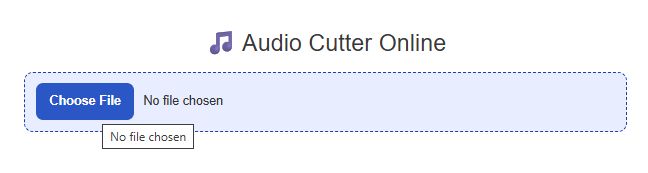
Step 1: Upload Your Audio File

Click on the Choose File button and select any audio file from your device.
Upload Your Audio File

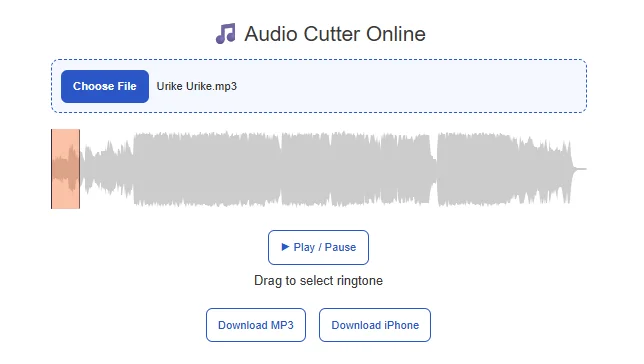
Step 2: View Audio Editor Tool

Once uploaded, you will see a waveform (audio graph) appear. This shows the full audio visually.
View Audio Editor Tool for ringtone maker

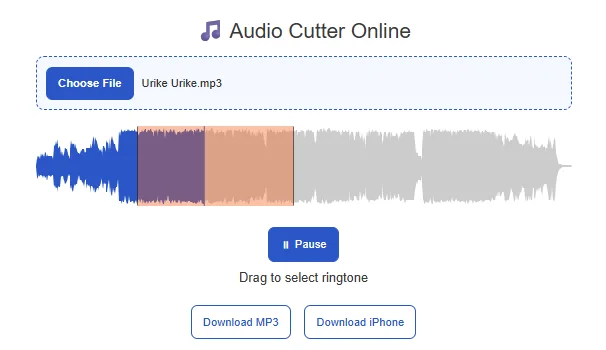
Step 3: Select Ringtone Area

  • Drag the highlighted section start and end points for music trim
  • Check your track by play and pause buttons
  • Click the Play button to listen to the selected portion. You can adjust the selection by start and end points until you get the perfect ringtone.
  • Resize it to choose your favorite ringtone part (usually 10–30 seconds)
Select Ringtone AreaStep 4: Download Your Ringtone

Choose your format:

πŸ“₯ Download MP3 β†’ For Android devices
πŸ“₯ Download iPhone (M4R) β†’ For iPhone users

Your ringtone will download instantly.

Which Format Should You Choose?

Device TypeRecommended Format
Android PhonesMP3
iPhone / iOSM4R
PC / LaptopMP3 or WAV

Supported AudioΒ Formats

You can upload almost any common audio file like MP3, WAV, M4A, AAC, OGG, FLAC (may depend on browser support).

Frequently Asked Questions (FAQs)

Yes, it is completely free with no hidden charges.

No. All processing happens in your browser. We do not store any files.

Make sure you selected a proper region and try re-downloading. Also check your device media player.

M4R is the ringtone format used by iPhones. You should use this format for iOS devices.

Yes, the tool is fully mobile-friendly and works on Android and iPhone browsers.

Usually 15 to 30 seconds is ideal for most devices.

Check if your file format is supported and try using a modern browser like Chrome.

You need to download the audio first (MP3 format), then upload it here.

he easiest way to crop and trim audio files for free is by using our online ringtone maker tool. It works directly in your browser, so you don’t need to install any software.

How it works:
Upload your audio file (MP3, WAV, M4A, etc.)
A waveform (audio graph) appears instantly
Drag and adjust the selection area to choose your desired part
Preview the trimmed section before downloading
Download your cropped audio in MP3 or iPhone (M4R) format

Why it’s the best:
100% free and fast
No file upload to server (privacy safe)
Works on mobile and desktop
Simple drag-and-trim interface

This makes it perfect for creating ringtones, notifications, or short audio clips.

Splitting audio from a song is simple with our online audio cutter tool.

Steps to split audio:

Upload your MP3 or audio file
Use the waveform editor to select the part you want
Adjust the start and end points by dragging
Preview the selected portion
Download the cut section instantly

Key advantage:

You don’t need technical skills β€” just drag, preview, and download.

This is ideal for extracting:

Favorite song lines
Background music clips
Dialogue or voice snippets

If you want to shorten an audio file, our tool makes it quick and easy.

Simple process:
Upload your audio
Select a shorter portion using the visual waveform
Play it to confirm
Download the shortened version

Supported formats:
MP3 (for Android and general use)
M4R (for iPhone ringtones)

Tip:
Keep your audio between 15–30 seconds for best ringtone results.

You can split audio into smaller parts using our tool by repeating the trimming process.

How to split into multiple parts:
Upload your audio file
Select the first segment using the waveform
Download it
Adjust the selection for the next segment
Repeat to create multiple clips

Use cases:
Creating multiple ringtones from one song
Splitting long recordings into smaller clips
Extracting different sections of music

πŸ› οΈ All Ringtone Audio Tools

Switch between any music tools and all tools work on the same audio file β€” apply multiple effects and download the final ringtone.

Ringtone Audio Tools

βœ‚οΈ Trim Audio

Cut and trim your audio file with precision

πŸ”Š Change Volume

Boost or reduce audio volume levels

⚑ Change Speed

Speed up or slow down audio playback

🎡 Change Pitch

Shift audio pitch without changing speed

🎚️ Equalizer

Enhance audio with 10-band equalizer

πŸ”„ Reverse Audio

Reverse audio playback direction

πŸŽ™οΈ Voice Recorder

Record audio directly from microphone

πŸ”— Audio Joiner

Merge multiple audio files into one

🌊 Fade In/Out

Add smooth fade in and fade out effects